Chrome extension for the Impact CRM

Dial more leads. In half the time.

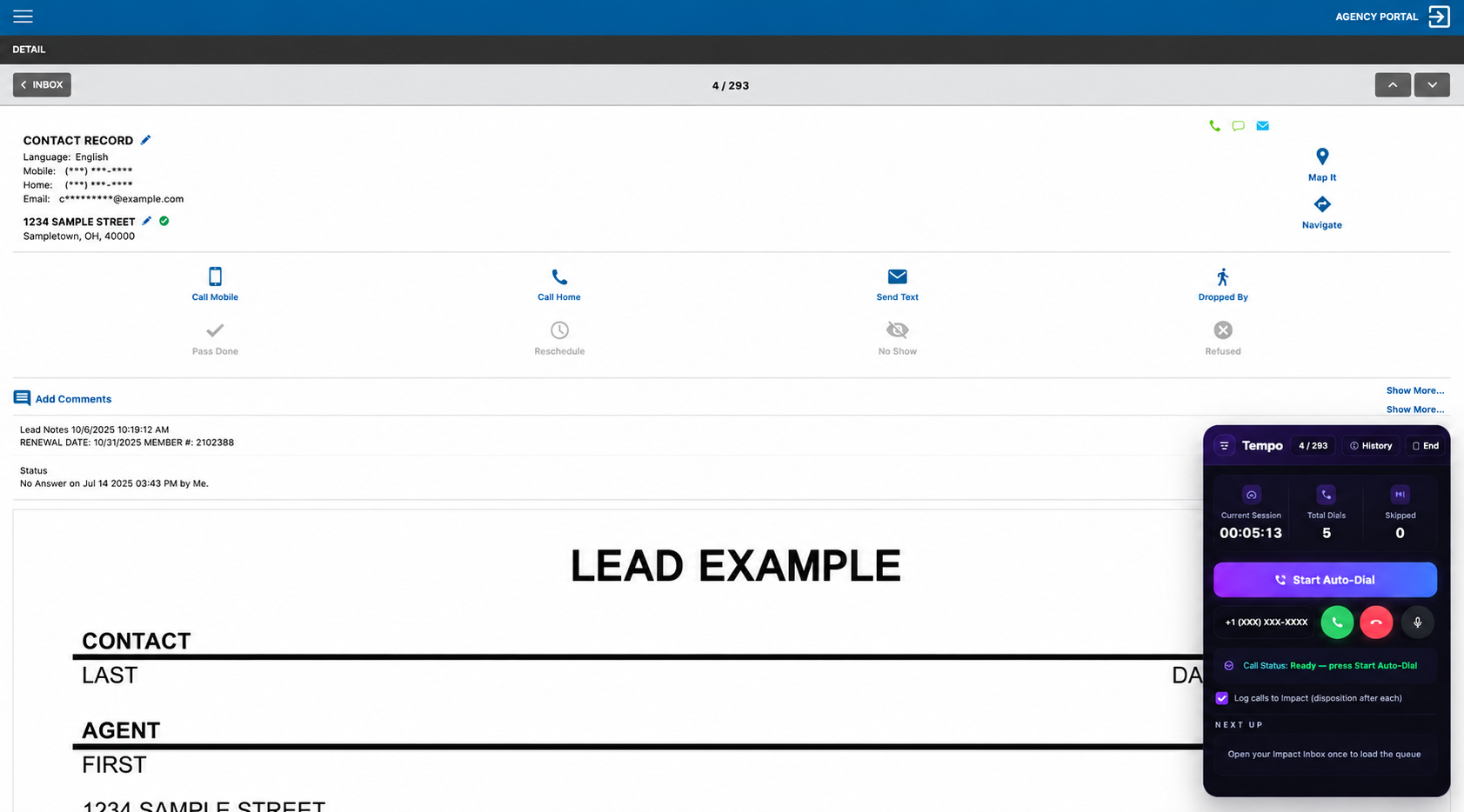
Tempo installs right over your Impact CRM and auto-dials your leads at 2× the speed — with a local caller ID, and every call logged straight back into Impact.

2-minute setup · No new software to learn · Works on top of the CRM you already use

Basic
$200/mo
150 dials/day
  • 4,500 dials / month
  • Local-presence number
  • Chrome extension
  • Logs calls to Impact
≈ $0.044 per dial
Get Started
BEST VALUE
Pro
$300/mo
275 dials/day
  • 8,250 dials / month
  • Local-presence number
  • Chrome extension
  • Logs calls to Impact
  • Priority support
≈ $0.036 per dial
Get Started
Ultra
$450/mo
450 dials/day
  • 13,500 dials / month
  • Local-presence number
  • Chrome extension
  • Logs calls to Impact
  • Priority support
≈ $0.033 per dial
Get Started

Every plan includes a local number, the Chrome extension, and Impact call logging · Cancel anytime · Team plans for agencies · Extra numbers $5/mo

Built to sit on top of Impact

No migration, no new dashboard. Tempo reads the leads you're already working and dials them for you.

🧩

Installs over your CRM

A Chrome extension that appears right on your Impact lead pages. Nothing new to learn — just faster dialing.

📍

Local presence

Call from a number in your leads' own area code so more of them pick up. Buy area codes as you need them.

🔁

Logged back into Impact

Every call is recorded in Impact and drops you on the disposition screen — your reporting stays exactly as AIL expects.

Auto-dial your inbox

Start a session and Tempo works down your lead list, dialing the next one automatically so you stay on the phone, not the mouse.

Up and running in minutes

1

Book a call

We get you set up and pick your area code.

2

Install the extension

Add Tempo to Chrome — takes about 2 minutes.

3

Open Impact

Log into the CRM you already use every day.

4

Start dialing

Launch a session and Tempo dials your leads.

Ready to double your dials?

Book a quick call and we'll get Tempo running on your team's Impact accounts.